Is my business on Google Maps?
Type your business name and town into the checker below, or search Google Maps for it. If it shows up, you're on Maps; then check it's claimed by you and where it ranks. If it doesn't, add it free at business.google.com/add and verify it.
Time needed: 30 seconds to check; 15 minutes to add or claimCheck now: is your business on Google Maps?
Nothing you type here is saved.
Three ways to check
- Use the checker above. It runs the same Google Maps search a customer would and shows your listing, whether it's claimed, your rating and your review count.
- Search Google Maps yourself. Open maps.google.com (or the app), type your exact business name and town, and look for your listing in the results or as a pin on the map.
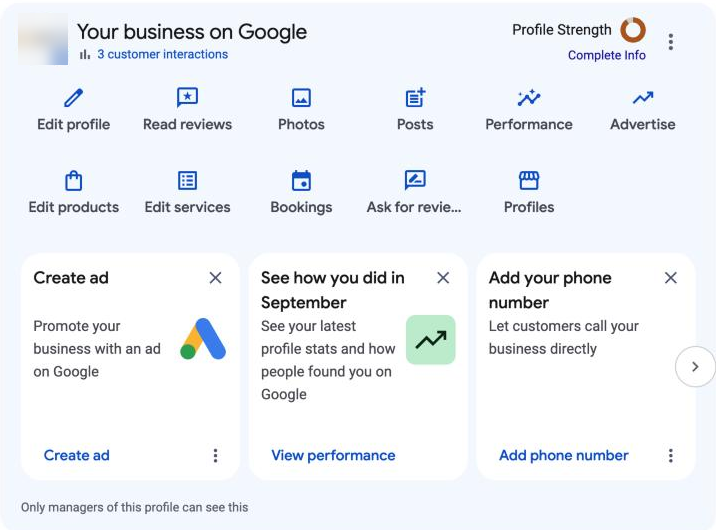
- Check the account you manage it with. Search your business name on Google while signed in to that account. If you manage it, a "Your business on Google" panel appears above the results, or you can open business.google.com.
Tip: Searching your own name only tells you the listing exists. It doesn't tell you whether customers searching "plumber" or "pool cleaning" three miles away can see you. That's a different question, covered below.
What your result means
| What you see | What it means | What to do |
|---|---|---|
| Your listing, and you manage it | You're on Google Maps | Check where you rank for the searches customers use (free scan) |
| Your listing with "Claim this business" or "Own this business?" | You're on Maps but nobody has claimed it | Claim it (steps below) so you control the details and can reply to reviews |
| Your listing, but someone else manages it | A past employee, agency or another person has access | Request access (steps below); the current owner has 3 days to answer |
| Nothing, or the wrong business | You're not on Google Maps yet, or the listing is hidden | Add your business (steps below), or check for a suspension |
How to add your business to Google Maps
Adding your business is free. From Google's help page:
- Go to business.google.com/add and sign in with the Google Account you want to manage the business with (use a business account, not a personal one you might lose).
- Choose Add your business to Google.
- Enter your business name exactly as it appears on your sign and paperwork, then pick the most specific category for what you do.
- Add your address if customers visit you. If you go to customers instead, add the area you serve and hide your address.
- Add your phone number and website, then choose a verification option and follow the steps.
Google only shows verified businesses on Maps and Search, and says new businesses can take up to a month to appear. See Google's verification guide.
How to claim a listing that already exists
If your business shows on Maps but nobody manages it, claim it. On a computer:
- Open Google Maps and search for your business name and town.
- Select your business, then Claim this business, then Manage now.
- Choose a verification option and follow the on-screen steps.
In the Google Maps app, open the listing, tap About, then Claim this business and Manage now.
If someone else already manages it
This is common when a former employee, a previous agency or a family member set it up. From Google's help page:
- Go to business.google.com/add and enter your business name and address.
- Pick your business. If you see Someone else may manage this Business Profile, continue.
- Choose Request access, fill in the form and send it.
The current owner gets an email and has 3 days to answer. If they don't, you may be able to claim it from the link in your confirmation email. Service-area businesses with no address have to contact Google support instead.
On Google Maps, but customers can't find you?
This is the most common situation we see. The listing exists, the owner can find it by name, but customers searching for the service don't see it. Google ranks local results by relevance, distance and prominence, so where you show up changes from street to street.
- Check your real ranking from many points across your area, not just from your desk. See how to check your Google Maps ranking, or run our free 81-place scan.
- Look for a problem with the listing: unverified, suspended, recent edits under review, or the wrong category. See why your business isn't showing on Google Maps.
- Close the gap with the businesses above you: reviews, categories, photos and a complete profile. Start with getting more Google reviews.
Keep your listing showing
- Keep it verified, and keep the account that manages it safe (add a second owner you trust).
- Use your real business name, with no added keywords or towns. Google can suspend listings that do.
- Keep your hours, phone number and website right, including holiday hours.
- Pick the most specific primary category, plus a few relevant extras.
- Get new reviews every week and reply to all of them.
- Add recent photos of your work.
Google's own advice is in tips to improve your local ranking.
Questions
Does it cost anything to be on Google Maps?
No. Adding, claiming and managing a Business Profile is free. Google says there's no way to pay for a better local ranking; ads appear separately and are labelled.
How long does it take for a new business to show on Google Maps?
Google says it can take up to a month after the profile is set up and verified. Edits to an existing profile can take up to three days.
Can I be on Google Maps without a shop or office address?
Yes. Service-area businesses (plumbers, cleaners, mobile services) can hide their address and set the area they serve instead.
I can see my business, so why can't my customers?
You're probably searching your business name from near your office. Customers search for the service from all over your area, and Google shows them different results. A grid scan shows what they see.
Do I need a website to be on Google Maps?
No, but a website helps customers and gives Google more information about what you do and where.